
Booking reliability / Refunds / Product notes
How Skedular Handles Failed Bookings and Refunds Reliably
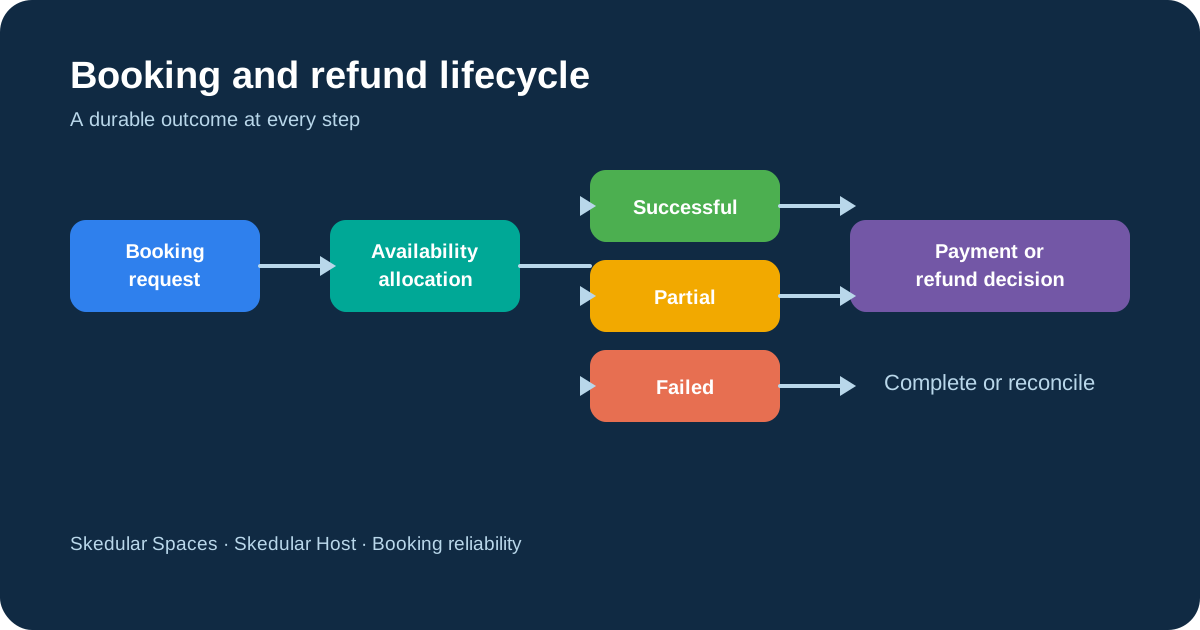
Failed bookings become especially difficult when payment has already been captured or only part of a recurring series can be created. Skedular is updating the booking and refund workflows used by Skedular Spaces and Skedular Host so these situations produce a clear booking result, an accurate refund amount, and a status that remains visible until the payment outcome is confirmed.
This work primarily applies to the public booking and payment workflows used by Skedular Spaces and Skedular Host. It covers complete booking failures and recurring series where only some requested dates remain available.
Some of this behavior exists today, including availability checks, booking and payment records, provider integrations, and parts of the refund flow. Durable failure outcomes, expanded refund lifecycle states, notification delivery records, and operational reconciliation are the implementation target for the current booking-reliability and refund-lifecycle work. They should not be read as a claim that every piece is already released.
In summary: Skedular is designing a traceable workflow for failed bookings, partial recurring series, and refunds that remain visible until the payment outcome is confirmed.
What happens when a booking cannot be completed
The current public booking form performs a live availability check, but that check happens before the final write. Availability can change in the meantime. The platform is implementing a final server-side allocation step that checks and claims the requested capacity as one operation. This is usually called atomic allocation: the availability decision and the reservation happen together, so another request cannot slip into the gap between them.
When that final step fails, the target behavior is a classified result rather than a generic error. The reason might be an unavailable date, an unsuitable requested resource, or a failure to complete the operation. The result remains available in the application, and if payment has already been captured it becomes the starting point for the refund workflow.
- Check and claim availability at the final point of booking commitment.
- Keep a durable failure record with the reason, time, booking context, and related events.
- Show the result in booking history and details, not only in a temporary form message.
- Offer a clear recovery path, such as choosing another time or returning to the listing.
Recording failed booking attempts
A customer, host, and organization administrator do not need the same message, but they do need the same truth. A customer should know whether no booking was created, whether only some recurring dates were created, and whether any payment is being returned. An owner should know which place or resource needs attention. A host should not discover a failed customer experience by accident.
A durable failure record means the outcome survives a page refresh, a workflow retry, and an operator handoff. A temporary message or email is not the system of record. The application history must remain the place where someone can confirm whether a booking was created, what happened to the payment, and what action is still open.
Booking failure notifications for customers, hosts, and operators
The notification design ties each message to the recorded availability outcome. Customers need to know whether no booking was created or whether a series changed. Hosts and organization owners or administrators need the affected location, product, resource, and dates so they can act. Notifications are delivered in the background. If delivery needs to be retried, the same recipient should not receive the message twice. Internally, this is handled through idempotency controls.
Handling partial recurring bookings
Consider a customer booking a meeting room every Tuesday for twelve weeks. Eleven dates are available, but one date becomes unavailable before the series is saved. Payment may already have been authorized or captured. The system needs to identify the unavailable occurrence, retain the result, and show the customer which dates were created and which were not.
The confirmed product rule is a 24-hour decision window. During that window, the created occurrences are held while the customer reviews the changed series. If the customer accepts, the unused portion is refunded. If the customer rejects the series or does not respond, the created occurrences are cancelled and the full payment is refunded. The operator receives the same outcome and can see the related payment and refund state.
How the customer accepts or rejects a partial series
This decision window exists for a practical reason. The customer needs time to decide whether eleven Tuesdays still work, while the operator cannot leave capacity reserved indefinitely. The application should show the successful dates, the unavailable date, the proposed partial refund, and the deadline for a decision in one place.
The partial outcome is not calculated from a guess about the subscription root. It is linked to the billed recurring booking and the occurrences that could not be created. That keeps the amount tied to the actual payment and booking scope.
A cancelled booking is not the same as a completed refund
Cancellation ends the booking or future entitlement. Refund completion means the money has been returned or the relevant manual payment has been confirmed. Those events can happen at different times and must remain separate in the customer view.
The customer should not have to guess whether the money has actually been returned. A refund approved for processing is not a completed refund, and a provider timeout should not be treated as either success or failure until the provider result is checked.
The refund lifecycle
| Refund status | Meaning | Customer-facing message | Next action |
|---|---|---|---|
| Requested | A refund request has been created. | Refund requested. | Apply policy and confirm the billed payment owner. |
| Under review | Approval or additional information is required. | Refund needs review. | An authorized operator reviews it. |
| Approved | The amount and path have been approved. | Refund approved; payment has not necessarily returned. | Start provider processing. |
| Processing | The provider operation has been submitted. | Refund processing. | Wait for provider confirmation. |
| Provider pending | The provider response is not final. | Refund status is being confirmed. | Reconcile before changing the state. |
| Completed | The refund outcome is confirmed. | Refund completed. | No further payment action is required. |
| Failed | The operation failed after the allowed retry path. | Refund delayed; support is reviewing it. | Retry or move to reconciliation. |
| Cancelled | The refund operation was stopped before completion. | Refund cancelled. | Review the reason and any remaining entitlement. |
| Reconciliation required | Local and provider records do not agree or are ambiguous. | Refund needs payment review. | An operator resolves it with provider evidence. |
How refund amounts are calculated
The refund calculation uses the cancellation policy saved when the customer purchased the booking. A later policy change must not alter the original agreement.
The calculation records the original payment, eligible amount, deductions, taxes, previous refunds, and final refundable amount. Financial calculations must preserve exact currency values and avoid floating-point rounding errors.
For every refund, the platform must first identify which billed booking owns the payment. This may be a one-time booking, a billed recurring booking, or a billed subscription cycle. Skedular uses that record as the single source of truth for the refund, internally referred to as the canonical billed owner. The same record is then used for the payment status, cancellation policy, refund calculation, payment allocation, and audit history.
Payment allocations connect each refund to the captured payment that funded the booking. This prevents completed and pending refunds from exceeding the amount actually paid.
Handling Stripe, Xero, and bank-transfer refunds
The refund workflow depends on how the customer originally paid. Stripe, Xero, and bank transfers each require different evidence before a refund can be considered complete.
Stripe refunds
The refund must use the original account, charge, and payment context. A post-payout refund may require a transfer reversal or another funding path. Stripe webhooks can update status, but duplicate events must be safe to process.
Xero credit notes and customer refunds
A Xero credit note is an accounting record against an invoice. It does not by itself prove that money has returned to the customer. The accounting state and the customer-money outcome therefore need separate handling and reconciliation.
Bank-transfer refunds
An authorized operator must approve and record the manual payment. The record should include who completed it, when it happened, and the payment reference. It should not be marked complete until that action is confirmed.
Refund retries, idempotency, and reconciliation
Networks fail. Webhooks are delivered more than once. A worker can time out immediately after a provider accepts a request. Every refund therefore carries a stable idempotency key, which is a unique reference that prevents the same financial operation from being submitted twice.
Provider operations use bounded retry behavior and preserve that same key. Reconciliation means comparing Skedular's refund record with the provider record to resolve missing, delayed, or contradictory results. Stripe can usually update the refund status through webhooks shortly after the provider responds. Xero and bank-transfer refunds may require scheduled checks or manual confirmation.
When human review is required
Sometimes the payment provider's response is unclear. In that situation, the system should stop and request human review. The same applies when a bank-transfer refund needs confirmation, a provider record cannot be matched, or local and external states disagree. When an operator begins reviewing a refund, the record should be temporarily assigned to them so another operator does not work on the same case at the same time. The reviewer should have the complete booking, payment, provider, and audit context before making a decision.
The target workflow is deliberately conservative: unresolved financial outcomes enter reconciliation or an operational review queue instead of being silently marked complete.
The booking and refund process
The intended end-to-end flow is:
- Check and claim the requested availability.
- Record whether the booking succeeded, partially succeeded, or failed.
- Notify the relevant customer, host, or organization administrator.
- Determine whether payment must be fully or partially returned.
- Calculate the refundable amount using the original membership terms.
- Submit the refund through the correct payment provider.
- Track the provider result until completion.
- Send unresolved outcomes for reconciliation or human review.
What this means for customers
Customers should be able to:
- Know whether the booking was created.
- See which recurring dates succeeded or failed.
- Understand how much is being refunded.
- See the current refund status.
- Know whether any action is required.
- Find the result in the application even if an email is delayed.
What this means for hosts and workspace operators
Hosts and operators should be able to:
- See a durable record of the failure.
- Identify the affected location, product, resource, and dates.
- Understand the payment and refund state.
- Avoid duplicate refund attempts.
- Review unresolved provider outcomes.
- See an audit history of important actions.
Frequently asked questions
These are the questions customers and operators are most likely to ask when a booking or refund does not follow the usual path.
What happens if payment succeeds but the booking fails?
The target workflow records the failed booking and starts a full refund for captured payment. The refund remains visible until the provider confirms its outcome.
Can I accept only the available dates in a recurring booking?
Yes. The confirmed 24-hour workflow lets the customer review and explicitly accept the available occurrences. The unavailable portion is then refunded.
Is a cancelled booking the same as a completed refund?
No. Cancellation ends the booking or future entitlement. Refund completion is a separate state that requires confirmed payment movement or manual-payment confirmation.
How long does a refund take?
Skedular can show the refund's current state, but the final timing depends on the payment method and provider. The platform should not label a refund complete before confirmation.
How are Stripe refunds handled?
The refund uses the original account, charge, and payment context. Webhook updates and retries are handled with stable references so duplicate events do not create duplicate financial operations.
Is a Xero credit note the same as returning money?
No. A Xero credit note is an accounting adjustment. The customer-money outcome must be tracked separately.
How are bank-transfer refunds confirmed?
An authorized operator records who sent the payment, when it was sent, and the payment reference. The refund is not complete until that action is confirmed.
What happens if the payment provider gives an unclear result?
The refund enters provider-pending or reconciliation-required handling until the actual outcome is confirmed. It is not silently marked successful.
Can the same refund be submitted twice?
Every refund receives a unique reference, and the system checks how much money remains available before submitting it. This allows failed operations to be retried without accidentally returning the same payment twice. Internally, this is handled through idempotency and payment-allocation controls.
Build a more reliable booking experience
Skedular Spaces helps workspace operators manage availability, recurring bookings, customer payments, cancellations, and refunds from one platform. Skedular Host provides a focused booking and payment experience for individuals renting an entire place.